For WMS, OMS, TMS and shipping software vendors
Documents, labels, cartons and printing, built into your software
Stop building report designers, label renderers, packing engines and print agents. Embed ours, run them in your environment or your customers', and ship the features your users ask for.


- Embed, don't buildWeb components and HTTP APIs that drop into Angular, React, Vue or plain HTML.
- Runs where you runReport Designer and Label Designer are single executables (Dockerfile included) for your cloud or your customer's premises. Data stays there.
- Licensed offlineSigned license keys checked locally. Nothing phones home, so air-gapped sites work.
Report Designer
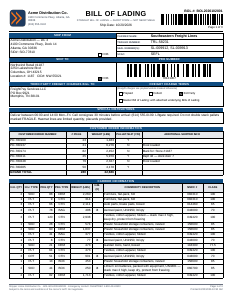
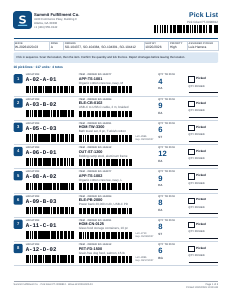
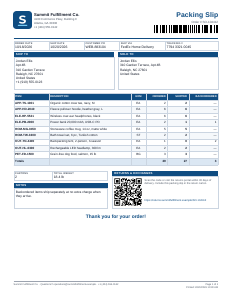
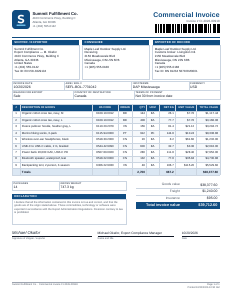
Your users design bills of lading, pick lists and invoices in your app; your back end turns template plus data into the PDF.
- Drag-and-drop designer
- PDF render API
- 20 warehouse templates
Label Designer
Render ZPL to label images dot for dot using Zebra's rules, and give your users a label designer inside your app.
- ZPL → PNG API
- Label designer component
- Labelary-compatible

Cartonization
Pick the boxes for an order, build the pallet, or slot goods into rack bins, with one 3D packing engine, and show your users the result in 3D.
- Cartons · pallets · rack bins
- 9 algorithms, ranked
- 3D view component

Slotting
Plan a compact group of put-wall bins for every order of a wave, and tell the operator which bin each scanned unit goes in.
- Compact bin clusters
- Scan station component
- Put-to-light: HTTP · MQTT

Print Daemon
Your cloud puts print jobs on a queue; they come out of the right printer in your customer's warehouse.
- SQS · Service Bus · Pub/Sub
- Zebra and office printers
- No inbound ports

Downloads
Download an evaluation build
Everything works with the evaluation license included in each build; output is marked as evaluation. Each build includes its developer portal and documentation: run it and open it in your browser.
Report Designer
1. The render service (required)
One archive per server platform. It holds the reportdesigner executable and its
fonts/ folder (Latin, Greek and Cyrillic families plus Chinese, Japanese and Korean). Unpack it and keep the
fonts/ folder next to the executable: the PDFs are rendered with those fonts.
The service also serves the designer to browsers at /sdk/latest/report-designer.js, with its
fonts. For script-tag pages this is all you need.
2. The SDK (only for npm builds)
One archive for all platforms. Download it if you bundle the designer into your front end with npm, or host the designer files yourself. Then you serve the fonts yourself too:
@rd/fonts: required, 14 MB@rd/fonts-cjk: optional, 34 MB, for Chinese, Japanese and Korean
Copy both into one folder your app serves and set font-base-url to it. The SDK also holds the
end-user guide as HTML.
Version 1.0.4
| Platform | File | Size | SHA-256 |
|---|---|---|---|
| Linux x64 | reportdesigner-1.0.4-linux-x64.tar.gz | 102 MB | 7bef976f119b… |
| Linux ARM64 | reportdesigner-1.0.4-linux-arm64.tar.gz | 101 MB | e389e0d7474c… |
| macOS Apple silicon | reportdesigner-1.0.4-darwin-arm64.tar.gz | 97 MB | 0b2c91129e56… |
| macOS Intel | reportdesigner-1.0.4-darwin-x64.tar.gz | 99 MB | f54777203157… |
| Windows x64 | reportdesigner-1.0.4-win-x64.zip | 94 MB | 9dd6aced48ae… |
SDK (optional, all platforms)
| Platform | File | Size | SHA-256 |
|---|---|---|---|
| All platforms | reportdesigner-sdk-1.0.4.tar.gz | 67 MB | fbab0da435f5… |
| All platforms | reportdesigner-sdk-1.0.4.zip | 67 MB | c168c04fe31a… |
Check a download with sha256sum -c SHA256SUMS --ignore-missing (macOS: shasum -a 256 -c): SHA256SUMS.
Label Designer
One self-contained executable per platform, with its fonts built in. It serves the render and merge API,
the browser components and their npm package at /sdk/, so there is nothing else to download. Start it with
labelviewer serve.
Version 1.0.1
| Platform | File | Size | SHA-256 |
|---|---|---|---|
| Linux x64 | labelviewer-1.0.1-linux-x64.tar.gz | 46 MB | 06e16e9a121f… |
| Linux ARM64 | labelviewer-1.0.1-linux-arm64.tar.gz | 45 MB | 9328f6b9089b… |
| macOS Apple silicon | labelviewer-1.0.1-darwin-arm64.tar.gz | 41 MB | 55179bc04a57… |
| macOS Intel | labelviewer-1.0.1-darwin-x64.tar.gz | 43 MB | 4d90e7cc10f7… |
| Windows x64 | labelviewer-1.0.1-win-x64.zip | 38 MB | 4ff223edf8d5… |
Check a download with sha256sum -c SHA256SUMS --ignore-missing (macOS: shasum -a 256 -c): SHA256SUMS.
Cartonization
One self-contained executable per platform: the packing API, the display components, the playground and
the documentation are inside it, so there is nothing else to download. Start it with cartonization serve.
Version 1.0.0
| Platform | File | Size | SHA-256 |
|---|---|---|---|
| Linux x64 | cartonization-1.0.0-linux-x64.tar.gz | 42 MB | 5aeaca103ab3… |
| Linux ARM64 | cartonization-1.0.0-linux-arm64.tar.gz | 42 MB | 3c7c8b2bdc6b… |
| macOS Apple silicon | cartonization-1.0.0-darwin-arm64.tar.gz | 38 MB | 422097f414b6… |
| macOS Intel | cartonization-1.0.0-darwin-x64.tar.gz | 40 MB | 930ed6837088… |
| Windows x64 | cartonization-1.0.0-win-x64.zip | 34 MB | cb8eff7dfdb1… |
Check a download with sha256sum -c SHA256SUMS --ignore-missing (macOS: shasum -a 256 -c): SHA256SUMS.
Print Daemon
Early access. One self-contained executable per platform, to install at each site: the admin UI and the
documentation are inside it, Node.js is not needed. LibreOffice (Office files), SumatraPDF and WinSW (Windows) are separate
free downloads. Start it with print-daemon run, or install it as a service.
Version 0.1.0
| Platform | File | Size | SHA-256 |
|---|---|---|---|
| Linux x64 | print-daemon-0.1.0-linux-x64.tar.gz | 43 MB | cb1f32696010… |
| Linux ARM64 | print-daemon-0.1.0-linux-arm64.tar.gz | 42 MB | f851fb7b0dc5… |
| macOS Apple silicon | print-daemon-0.1.0-darwin-arm64.tar.gz | 38 MB | a3a97ca6d2d1… |
| macOS Intel | print-daemon-0.1.0-darwin-x64.tar.gz | 40 MB | cfe8ccb47d86… |
| Windows x64 | print-daemon-0.1.0-win-x64.zip | 35 MB | 91463a2f1f64… |
Check a download with sha256sum -c SHA256SUMS --ignore-missing (macOS: shasum -a 256 -c): SHA256SUMS.
macOS and Windows may warn that the executables are not signed; see the quick start in each archive. Cartonization has no download yet: try the live demo or ask us for an evaluation. Neither has Slotting: try its live demo. Print Daemon is early access: tell us about your pilot.
How it fits your product
Three steps from evaluation to release
Embed the components
Load the designer or viewer from the install and drop the element into your page. Your app keeps the templates in its own database.
Call the API from your back end
Template plus order data in, PDF or label image or printer-ready ZPL out. Stateless, so it scales with more instances.
Ship it with your product
Deploy it next to your services or at your customers' sites, style it with your colours, and install a license key.
Ready on day one
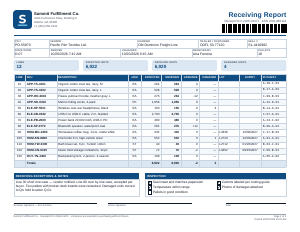
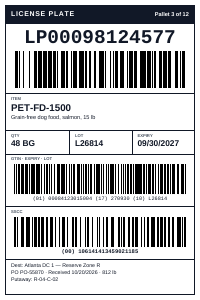
Warehouse documents your users can start from
Try everything free
Report Designer and Label Designer evaluation builds include a license, so you can build your integration before you buy.
The live demos on this site run the evaluation version with request limits. Don't send them real customer data.